API Keys
Self-service API key creation and revocation
Last updated October 20, 2026
API keys are built on better-auth's @better-auth/api-key plugin. Users create and revoke their own keys in the dashboard; your server code verifies them with the same plugin.
Data model
Keys live in the apikey table (src/db/schema.ts). Its columns follow the plugin's built-in apiKeySchema: 21 declared fields plus the automatic id, with indexes on config_id / reference_id / key.
Plaintext never reaches the database. The plugin hashes the full key with SHA-256, encodes it as base64url (no padding), and stores that in the key column. The list endpoint returns only start (the first few characters), so an issued key can never be read back.
The key column carries no unique constraint — it is a hash, collisions are negligible, and the plugin itself creates only a plain index.Settings page
/dashboard/api-keys (src/routes/{-$locale}/_layout/dashboard/api-keys.tsx). Its entry appears in the dashboard sidebar and is governed by the features.enableApiKeys flag.
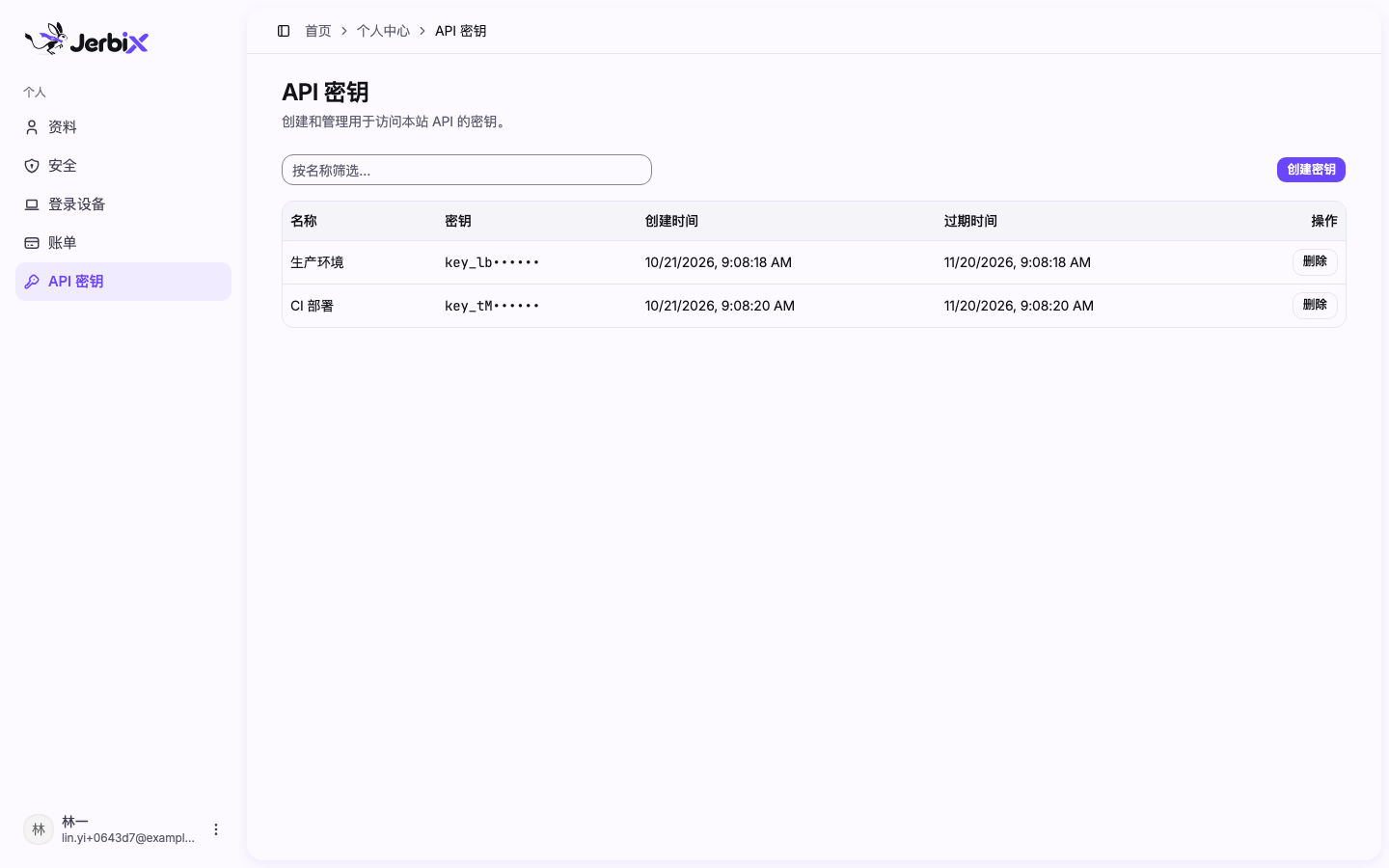
- Create: enter a name and pick an expiry →
authClient.apiKey.create({ name, expiresIn }).
The response contains the plaintext `key`; the page shows it once in a second dialog and tells the user to save it.
- List:
authClient.apiKey.list()→{ apiKeys, total, limit, offset }. Entries carry no
plaintext; the mask uses start.
- Delete:
authClient.apiKey.delete({ keyId })→{ success }.
Expiry
expiresIn is measured in seconds; null means no expiry. The UI offers 30 / 90 / 365 days plus "never", and defaults to 30 days.
The default is 30 days rather than "never" because keys end up in CI config and third-party integrations — places nobody looks at again. A long-lived key that leaks can only be contained by deleting it by hand. GitHub PATs and Stripe make the same call.
The 365-day ceiling is not arbitrary: the plugin's keyExpiration.maxExpiresIn defaults to 365, and anything above it is rejected with EXPIRES_IN_IS_TOO_LARGE. Aligning the UI ceiling with the server default means users cannot pick a value that is guaranteed to fail.
The choice only matters at creation time — the plugin converts expiresIn into an expiresAt timestamp, and the list page reads that one timestamp. There is no way to extend a key in the UI afterwards; delete it and create a new one.
To change the default or the options, edit EXPIRY_OPTIONS and DEFAULT_EXPIRY_DAYS at the top of src/routes/{-$locale}/_layout/dashboard/api-keys.tsx; the server-side ceiling is in the section below.
Server-side verification
verifyApiKey is a server-only endpoint and can only be called on the server:
const result = await getAuth(env).api.verifyApiKey({ body: { key } })
if (!result.valid) return new Response('Unauthorized', { status: 401 })
result looks like { valid: boolean; key: { id, referenceId, ... } | null; error?: { message, code } }. On failure valid is false and key is null, with the reason in error.code (such as KEY_NOT_FOUND / KEY_EXPIRED / KEY_DISABLED).
Requests use the x-api-key header by default.
Server-side expiry bounds
expiresIn comes from the client, so the server needs a hard boundary — otherwise any caller can mint a key that dies in a second or one that never expires. The plugin enforces this built in, and this repo currently relies on its defaults:
| Option | Default | Meaning |
|---|---|---|
keyExpiration.minExpiresIn | 1 | Smallest allowed day count; below it → EXPIRES_IN_IS_TOO_SMALL |
keyExpiration.maxExpiresIn | 365 | Largest allowed day count; above it → EXPIRES_IN_IS_TOO_LARGE |
keyExpiration.disableCustomExpiresTime | false | When true, client values are ignored in favour of defaultExpiresIn |
keyExpiration.defaultExpiresIn | null | Fallback day count when the client omits expiresIn; null means no expiry |
The UI's EXPIRY_OPTIONS ceiling (365) is aligned with that default maxExpiresIn, so users cannot select a value that is bound to be rejected.
To tighten it, pass keyExpiration explicitly in src/auth/auth.ts:
apiKey({
  defaultPrefix: 'key_',
  keyExpiration: { minExpiresIn: 1, maxExpiresIn: 90, defaultExpiresIn: 30 * 86_400 },
})
Change the UI too when you change the ceiling. A server-side rejection only fails the create request with an error message, while the option stays visible in the dropdown — the two values have to move together.
disableCustomExpiresTime: true is the "server decides the expiry" switch, suited to a policy such as "every key rotates every 90 days". When it is on, remove the expiry picker from the UI as well — otherwise it is a control that does nothing.
defaultPrefix is key_, so every new key carries that prefix. **Turning features.enableApiKeys off makes the whole /api/auth/api-key/* HTTP surface return 404 — this is not just the UI disappearing, it is the create / list / delete management capability shutting down: users can no longer manage keys through the plugin endpoints. The gate lives in the route layer at `src/routes/api/auth/$.ts`. But a direct server-side call is unaffected: `getAuth(env).api.verifyApiKey({ body: { key } })` is a function call, not an HTTP route, so it bypasses that gate. Whether an issued key keeps working is therefore the caller's decision: if you want the flag to disable verification too, check `websiteConfig.features.enableApiKeys` in your own route. Plaintext appears only in the create response** and is never returned again — a user who did not save it must delete the key and create a new one.References
- better-auth API Key plugin — options, rate limiting, and refill
@better-auth/api-key— endpoints such asverifyApiKey